e Challan Parivahan: Check Traffic Challan and Pay Fine Online
Quick e Challan Status Check
Check your pending traffic challan by vehicle number, challan number or driving licence number. You can verify fine details, pay e challan online, check payment status and save your receipt safely.
Enter Details
Use vehicle number, challan number or DL number to start the challan status check.
Verify Challan
Check fine amount, offence type, challan date, status and payment option carefully.
Pay and Save Receipt
Complete online payment through the official portal and keep the receipt as proof.
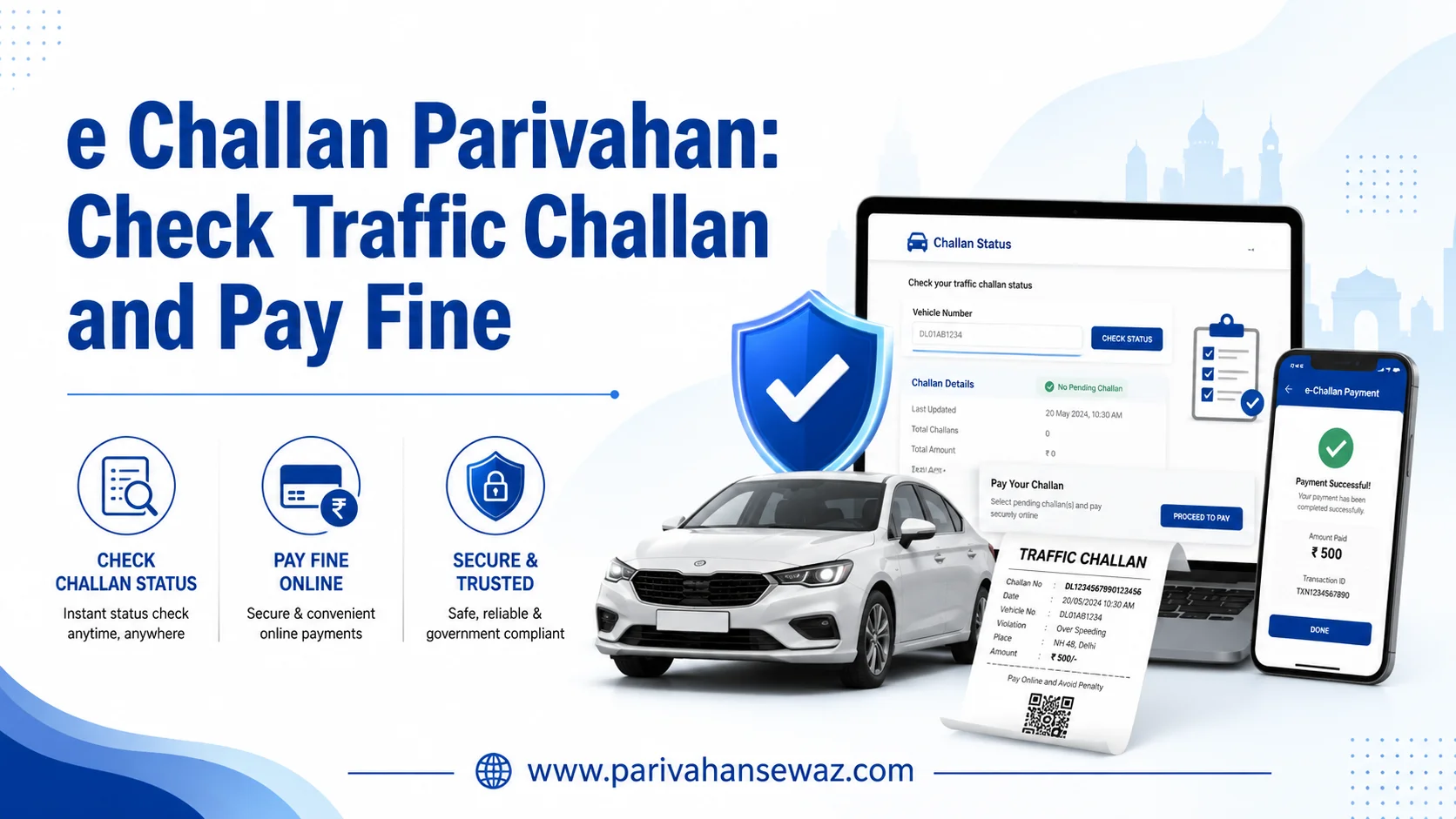
If you drive a car, bike, scooter, taxi, truck or any other vehicle in India, checking traffic challan status is important. Many challans are now issued digitally through cameras, traffic police devices and online enforcement systems. Because of this, vehicle owners often search for e Challan Parivahan, challan check online, check challan by vehicle number, and pay traffic challan online.
The e Challan Parivahan system helps users check whether any traffic fine is pending against their vehicle, driving licence or challan number. You can also view challan details, verify payment status, pay the fine online and save the payment receipt for future use.
This guide explains the complete process in simple Indian English so that you can check your challan status without confusion and avoid fake e-challan links.
What is Parivahan e Challan?
Parivahan e Challan is a digital traffic challan service where traffic violations are recorded and managed online. If a person breaks a traffic rule, the challan can be generated electronically by the traffic police or transport department.
These challans may be issued for offences like overspeeding, red light jumping, wrong parking, driving without helmet, not wearing seat belt, no valid pollution certificate, or using mobile phone while driving.
Instead of visiting the traffic police office again and again, users can check their challan details online. The system is useful for private vehicle owners, commercial drivers, second-hand vehicle buyers and people who want to clear pending fines before any RTO-related work.
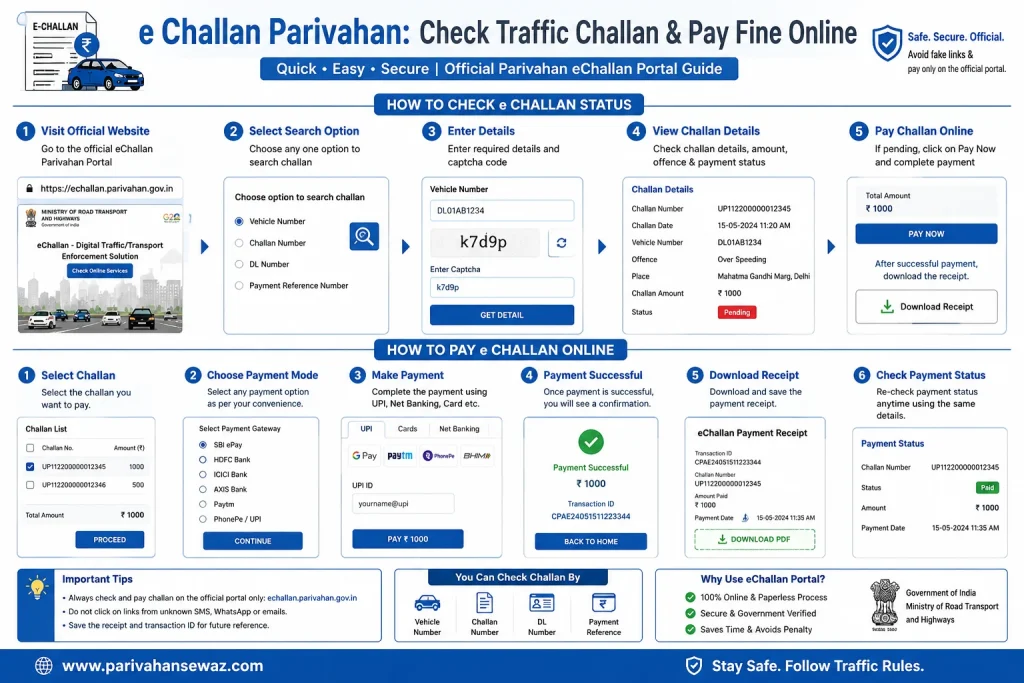
How to Check e Challan Status Online by Vehicle Number, Challan Number or DL Number
You can easily check e challan status online through the Parivahan portal using your vehicle number, challan number, or driving licence number. This is the quickest way to verify pending traffic fines, view challan details, and proceed to payment if required.
Visit the e Challan Portal
Open the e-Challan Parivahan website to start the online challan status check process.
Select a Search Method
Choose whether you want to check by vehicle number, challan number, or driving licence number.
Enter Required Details
Fill in the selected number carefully and enter the captcha shown on the screen.
View Challan Details
Check the challan amount, offence type, date, location, and current payment status.
Pay If Fine Is Pending
If any challan is unpaid, you can continue to online payment and then save the receipt.
Details You Can Use to Check Challan
The portal gives multiple ways to search traffic challan details. This makes it easier for different users to find their pending challan quickly.
- Vehicle Number: best for most car and bike owners
- Challan Number: useful when you have received challan SMS or notice
- DL Number: useful for driver-related challans
- Captcha Entry: required before fetching challan details
What If No Challan Record Is Found?
Sometimes the portal may show No Record Found. This does not always mean there is no challan. It may happen due to incorrect details or data update delay.
- Check whether the number is entered correctly
- Try another search method if available
- Refresh and try again after some time
- Use the exact format of vehicle or challan number
Regular checking can help you avoid late payment issues and future problems during vehicle sale, ownership transfer or document verification.
Details Needed to Check Challan Online
To check challan online, you may need one of these details:
| Check Method | Detail Required | Best For |
|---|---|---|
| Vehicle Number | Registration number of car, bike or other vehicle | Most vehicle owners |
| Challan Number | Challan number from SMS or notice | Checking one specific challan |
| DL Number | Driving licence number | Driver-related challan |
| Payment Reference | Transaction or payment detail | Payment verification |
| Mobile SMS Detail | Challan message received on phone | Cross-checking suspicious messages |
The most searched method is check challan by vehicle number, because many users do not have the challan number with them.
How to Check Challan by Vehicle Number
To check challan by vehicle number, visit the official e-Challan Parivahan portal and use the challan status option. Enter the vehicle registration number correctly. Make sure the letters and numbers are typed properly.
For example, if your vehicle number is like DL 01 AB 1234 or MH 04 AB 5678, enter it carefully as shown on your RC or number plate. After entering the details, complete the captcha and submit the request.
If any challan is available, the portal may show challan number, offence type, fine amount, date, time, location and payment option. If no challan is found, you may see a message like no record found.
Check e Challan by Challan Number
If you have received a challan SMS or printed notice, checking by challan number is a direct method. You only need to enter the challan number and verify the details.
This method is useful when you want to confirm one particular challan. Before paying, match the vehicle number, offence, amount and date. Do not pay if the details do not match your vehicle or driving record.
Check Challan by Driving Licence Number
Some challans are linked with the driver’s licence instead of only the vehicle number. This can happen when the violation is related to the driver. In that case, you can use the DL number challan check option.
Commercial drivers, taxi drivers, transport vehicle drivers and people who drive multiple vehicles should check challan status using their driving licence number from time to time.
How to Pay e Challan Online on Parivahan: Step-by-Step Official Guide
If your e challan check shows a pending fine, you can safely complete Parivahan challan payment online through the official portal. Follow this simple process to check the challan, pay the fine, and download the receipt without visiting the traffic police office.
Open the Official Portal
Visit the official e-Challan Parivahan website to begin the online challan payment process safely.
Search Your Challan
Check challan by vehicle number, challan number, or driving licence number.
Verify Fine Details
Confirm the challan amount, offence type, date, and status before you move to payment.
Pay the Challan Online
Choose a payment option like UPI, debit card, credit card, or net banking and complete payment.
Download the Receipt
After successful payment, save the challan receipt or payment proof for your records.
What Happens After You Pay the Challan?
In most cases, the challan status updates shortly after successful payment. You should still keep proof of payment and verify the updated status once again.
- Save the challan payment receipt immediately
- Keep the transaction ID or bank reference number
- Recheck the challan status after some time
- Use the receipt if any status mismatch appears later
Payment Deducted but Challan Not Updated?
This is a common issue during online challan payment. It may happen due to payment gateway delay, slow internet, or delayed portal update.
- Wait 30 to 60 minutes and check the status again
- Do not make the payment again immediately
- Keep your payment screenshot and transaction details safe
- If needed, use the pending transaction or payment status option
Do not refresh or close the payment page while the transaction is processing. Wait until the final status is shown.
How to Download e Challan Receipt
After successful payment, downloading the receipt is very important. The receipt works as proof that you have paid the challan.
You may need the receipt later for:
- Payment proof
- RTO-related work
- Vehicle sale or transfer
- Dispute resolution
- Bank transaction issue
- Court or Virtual Court clarification
To download the receipt, check the challan status again using the same details. Open the paid challan record and look for the receipt or transaction option. Save the PDF or screenshot in your mobile phone.
What If Payment is Deducted But Challan Still Shows Pending?
Sometimes users pay the challan online, money gets deducted, but the status does not update immediately. This may happen due to bank server delay, payment gateway issue or portal update delay.
In this situation, do not make the payment again quickly. First, wait for some time and then check payment status or pending transaction status.
Keep these details safe:
- Challan number
- Vehicle number
- Bank reference number
- Transaction ID
- Date and time of payment
- Payment screenshot
- UPI or card transaction proof
If the status is not updated even after some time, contact the concerned support or traffic authority with payment proof.
Common Traffic Violations That Lead to e Challan
Traffic challans can be issued for many reasons. Some common violations are:
- Driving without helmet
- Driving without seat belt
- Overspeeding
- Signal jumping
- Wrong side driving
- Wrong parking
- No valid insurance
- No valid pollution certificate
- Driving without licence
- Using mobile while driving
- Dangerous driving
- Overloading commercial vehicle
- Triple riding on two-wheeler
Fine amount may vary depending on the state, vehicle type and offence category.
Virtual Court and Lok Adalat Challan
Some traffic challans may move to Virtual Court if they are not paid within the given time or if the matter requires court processing. When a challan is sent to court, the normal payment option may not work in the same way.
In such cases, you may need to follow the Virtual Court process. Some challans may also be settled through Lok Adalat, depending on the state and traffic department rules.
If your challan status shows court-related information, do not ignore it. Read the instructions carefully and complete the required process.
How to Avoid Fake e Challan Links
Fake e-challan messages are a serious problem. Fraudsters may send SMS or WhatsApp messages saying that a traffic challan is pending. These messages may contain fake links, payment pages or APK files.
To stay safe:
- Do not click unknown challan links.
- Do not install any APK file from SMS or WhatsApp.
- Do not share OTP, UPI PIN or card PIN.
- Do not make payment through personal links.
- Always verify challan on the official portal.
- Check website spelling carefully.
- Do not trust messages from unknown mobile numbers.
A real challan should be verified through a trusted government portal or authorised payment system. If any message looks suspicious, check the challan manually instead of clicking the link.
e Challan Check Before Buying a Used Vehicle
If you are buying a second-hand car or bike, always check pending challans before final payment. Many buyers check RC, insurance and condition of the vehicle, but forget to check traffic fines.
Pending challans can create trouble later. Before buying a used vehicle, search the vehicle number on the e-Challan portal and confirm that no unpaid challan is pending. Ask the seller to clear all fines before ownership transfer.
This is a smart and safe step for used vehicle buyers in India.
Quick Tips for Safe Online Challan Payment
Before paying any challan online, follow these simple tips:
- Match vehicle number before payment.
- Check offence date and location.
- Confirm the fine amount.
- Use only trusted payment options.
- Save receipt after payment.
- Check status after payment.
- Avoid random links from SMS.
- Never share OTP or PIN with anyone.
These small steps can protect you from fraud and wrong payment.
Final Words
e Challan Parivahan makes traffic challan checking and payment easier for Indian vehicle owners and drivers. You can check challan status online using vehicle number, challan number or driving licence number. You can also pay the fine online and download the receipt after successful payment.
The safest method is to verify the challan details properly before making payment. Also, avoid fake e-challan SMS or WhatsApp links because many fraud messages look similar to official alerts.
If you drive regularly, check your e challan status from time to time. It helps you clear pending fines, avoid court-related issues and keep your vehicle record clean.